You do not have a productivity problem. You have a deciding problem: forty tasks, one free half-hour, and no energy left to referee between them. So the half-hour dies to scrolling.
The hidden tax on every to-do list
Every time you open a list, you pay twice: once to scan it, once to choose from it. Choosing is the expensive part. Researchers call the depletion decision fatigue, and it explains the familiar paradox where a person with two free hours and twenty tasks does none of them. The list did its job; the choosing broke down. By evening, when the gaps finally open up, your chooser is the most worn-out part of you.
What "telling you what to do" actually requires
A random task picker would be useless: it might hand you a two-hour deep-focus task as you stand in a school pickup line. Picking well means knowing three things at once:
- Everything on your plate, which is why Sukima starts with the brain dump: the pick is only as good as the pile it picks from.
- The moment you are in: fifteen minutes before a call is not the same resource as a quiet Saturday morning.
- What things actually take, so the task handed to you fits the gap instead of mocking it.
How the Pick works in Sukima
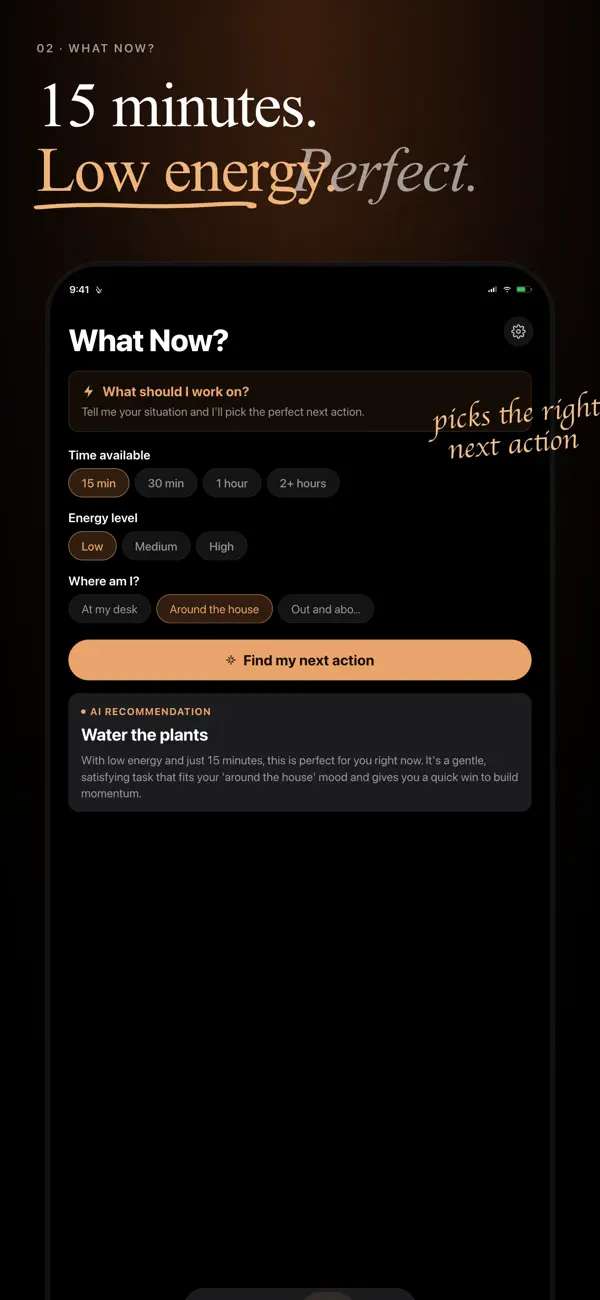
You open the app and tap "What now?". Sukima answers with one task: not a filtered list, not a top five, one thing, chosen for the time you have. Do it, and ask again if the gap continues. Skip it, and the next pick learns something about what you skip. The interface is deliberately shaped like an answer rather than a menu, because a menu would hand the deciding right back to you.
- Morning: brain dump anything new rattling around.
- Between meetings: "What now?" Fifteen-minute gap, fifteen-minute task.
- Waiting for pickup: "What now?" A phone call gets made.
- Evening: the list is shorter and you never once stared at it.
Doesn't this just avoid learning to prioritize?
Prioritizing is real work, and it belongs in a weekly review, not in every crack of the day. Delegating the moment-to-moment choosing is the same move as automating bill payments: not a character flaw, just moving a repeated decision to a system so your judgment is fresh for decisions that deserve it. You still steer; Sukima just stops the steering from happening forty times a day.
Frequently asked questions
Keep reading
Your day is full of gaps. Sukima fills them.
Brain dump everything on your mind and get told exactly what to do next. No setup, no sorting, no decisions required.
Download on the App Store Get it on Google Play Open the web app →